Search what was said and shown
Find a moment in a video by what was said.
Lutri turns the speech in your videos and voice memos into searchable text on your phone, and samples the frames so you can find a scene too. Tap a result and the video opens at that moment.
Coming soon to iPhone and Android.
See pricing- Speech model built in
- No microphone recording
- Free to start
In three steps
How it finds the moment
Lutri reads each video and voice memo once.
It transcribes the first 15 seconds of speech with a speech model that is bundled in the app, and samples frames through each video. All of it happens on your phone, with no recording and no upload.
You search for a word or a scene.
Type a phrase you remember, or describe what happened. Spoken-word matches work as soon as a file is indexed. Scene matches also need the optional visual model.
The result opens at that moment.
The player jumps to the matching point. With Full Access it also shows the words that were said, with a Copy quote button.
Examples
Try searching for
A few words you remember hearing are enough.
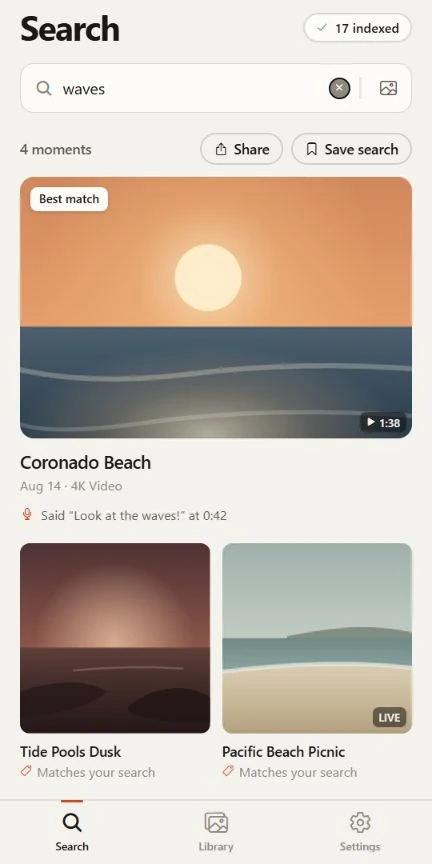
“look at the waves”
A line someone said in a video.
“happy birthday”
A song, a toast or a greeting.
“we are boarding now”
A voice memo or a clip with an announcement.
“people clapping on a beach”
A scene, once the visual model is installed.
Results depend on your own videos and are approximate.
The honest part
What to expect
The speech model is small so it can run on a phone. These are the trade-offs.
- Lutri reads the first 15 seconds of speech in each file.
- A quote from later in a long video can be missed. Short clips and voice memos are covered well.
- Speech recognition is approximate.
- Clear speech works best. It can miss or mishear words, accuracy varies by language and recording quality, and in noisy clips it can write words nobody said.
- Voice memos are an Android option.
- Turn on Include voice memos in Settings and Android asks for permission to read audio files. Recordings are listed by file name and date, and searched by what was said.
- Lutri does not record or upload.
- It reads videos and audio that already exist on your phone. It does not use the microphone, and your recordings and their transcripts are not sent to us or anyone else.
- Free finds the moment.
- Spoken-word search works on the free version within its limits (150 media items, top 25 results). Full Access also shows the spoken excerpt and where it was said.
Questions
Video and voice questions
More answers are in the full list of questions and on the support page.
How much of a video does Lutri listen to?
Speech indexing currently reads the first 15 seconds of speech in each file. A quote that comes later in a long video can be missed.
Does it record me or upload my videos?
No. Lutri reads videos and voice memos that already exist on your phone and transcribes them there. It does not record through your microphone, and it does not upload recordings or transcripts.
Are voice memos included?
On Android, yes, once you turn on Include voice memos in Settings. Android then asks for permission to read audio files.
How accurate is the speech recognition?
It uses a small speech model so it can run on a phone. Clear speech works best. It can miss or mishear words, and in noisy clips it can write words nobody said.
Find the moment, not just the file.
Free to start. No account needed. Your videos stay on your phone.
Coming soon to iPhone and Android.