Search by description
Find a photo by describing it.
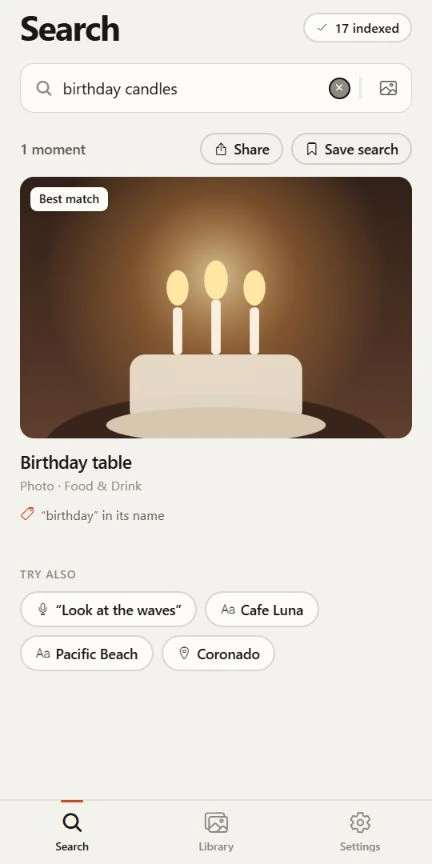
Type what you remember: a dog running into the waves, a red bicycle, a whiteboard full of arrows. Lutri compares your words with what it learned about each picture, on your phone, and puts the closest matches first.
Coming soon to iPhone and Android.
See pricing- Runs on your phone
- Works offline after setup
- Free to start
In three steps
How a search works
Lutri reads your library once.
With your permission it looks at each photo on your phone and builds a private index there. It reads your pictures where they are, and a file moves only when you choose Delete.
You describe what you remember.
Results update as you type. Lutri weighs the meaning of your words against each picture, and also looks for the same words in file names, in text found in pictures and in spoken words, so a literal search works too.
You open the closest match.
Each result says why it appeared, such as a word in its name or a line someone said, so you can tell a good match from a near miss without opening everything.
Examples
Try searching for
Everyday words are enough. You do not need the right keyword or the file name.
“birthday candles”
A scene, in everyday words.
“red bicycle against a brick wall”
An object and where it was.
“whiteboard with a diagram”
Something you photographed to remember.
“sunset over the water”
A time of day or a mood.
Results depend on your own photos and are approximate.
The honest part
What to expect
Photo search is useful because it is honest about what it can and cannot do.
- Scene and object search needs one download.
- The optional visual model is about 388 MB and downloads once from Hugging Face, best on Wi-Fi. Until it is installed, Lutri still finds photos by file name, date, the text in them and the words spoken in them.
- Results are approximate.
- Lutri ranks pictures by how well they match your words. It can miss a photo or rank one lower than you expect, so look through a few results before deciding a photo is not there.
- It describes what is in a picture, not who is in it.
- Lutri cannot tell people apart across photos. Describe the scene, the place or a detail instead of a name.
- A large library takes time.
- Lutri indexes in batches, by default while the phone is charging and preferably at night. You can search while it works, and new matches appear as each batch finishes.
- Search with a photo too.
- Choose a photo with your phone’s photo picker and Lutri looks for pictures that look like it. It reads that one photo to search and does not add it to your index.
- Free is limited by count, not by time.
- The free version indexes up to 150 media items and shows the top 25 results for each search. Full Access removes both limits. A very broad search shows the closest 480 matches and asks you to add a word.
Questions
Photo search questions
More answers are in the full list of questions and on the support page.
Does photo search need the internet?
Only once. Scene and object search use an optional 388 MB model that downloads from Hugging Face the first time you ask for it. After that, searching runs on your phone, with or without a connection.
Can I search with a photo instead of words?
Yes. Choose a photo with your phone’s photo picker and Lutri looks for pictures that look like it. Lutri reads that one photo to search and does not add it to your index.
Can I search for a specific person?
Not by name. Lutri cannot tell people apart across photos, so describe the scene, the place or a detail instead.
Which photos can it search?
The photos and videos you let Lutri read: your whole library, or only the ones you pick. Media that exists only in the cloud has to be downloaded to the phone first.
Find the photo you were thinking of.
Free to start. No account needed. Your photos stay on your phone.
Coming soon to iPhone and Android.